
DRAG DROP
You have a Microsoft Deployment Toolkit (MDT) server named MDT1.
When computers start from the LiteTouchPE_x64.lso image and connect to MDT1. the welcome screen appears as shown In the following exhibit.
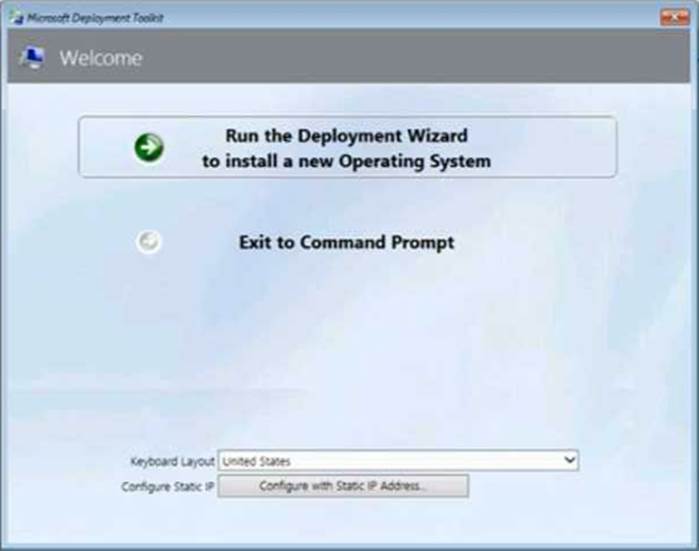
You need to prevent the welcome screen from appearing when the computers connect to MDT1.
Which three actions should you perform in sequence? To answer move the appropriate actions from the list of actions to the answer area and arrange them in the correct order.
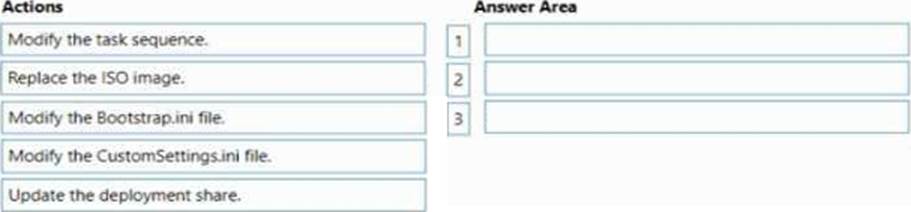
Answer: 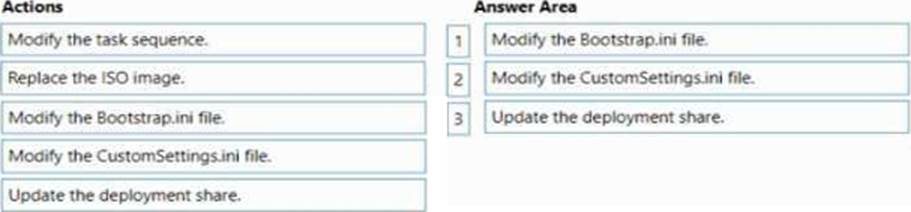
Explanation:
Box 1: Modify the Bootstrap.ini file.
Add this to your bootstrap.ini file and then update the deployment share and use the new boot media created in that process:
SkipBDDWelcome=YES
Box 2: Modify the CustomSettings.ini file.
SkipBDDWelcome
Indicates whether the Welcome to Windows Deployment wizard page is skipped.
For this property to function properly it must be configured in both CustomSettings.ini and BootStrap.ini. BootStrap.ini is processed before a deployment share (which contains CustomSettings.ini) has been selected.
Box 3: Update the deployment share.
Reference: https://docs.microsoft.com/en-us/mem/configmgr/mdt/toolkit-reference#table-6-deployment-wizard-pages
Latest MD-102 Practice Questions with 98 Q&As
Updated Study Material | Instant Download | Detailed Answers and Explanations