Facebook Blueprint 410-101 Facebook Certified Media Buying Professional Online Training
Facebook Blueprint 410-101 Online Training
The questions for 410-101 were last updated at Jan 09,2026.
- Exam Code: 410-101
- Exam Name: Facebook Certified Media Buying Professional
- Certification Provider: Facebook Blueprint
- Latest update: Jan 09,2026
You’ve recently installed the Facebook Pixel on a new website. You are not sure if the website is detecting your pixel events correctly.
What are some tools you can use to troubleshoot your pixel and make sure it’s collecting your events properly?
(Select 3 that apply.) Choose ALL answers that apply.
- A . You should install the Facebook Pixel Helper chrome extension to verify your pixel event.
- B . You can test your events in the "Events Manager" under your Business Manager C. You should check your campaigns to see if they are showing events.
- C . You can track events and debug your pixel through Facebook’s Analytics dashboard E. You should install a second pixel and make sure it works properly
You’ve recently installed the Facebook Pixel on a new website. You are not sure if the website is detecting your pixel events correctly.
What are some tools you can use to troubleshoot your pixel and make sure it’s collecting your events properly?
(Select 3 that apply.) Choose ALL answers that apply.
- A . You should install the Facebook Pixel Helper chrome extension to verify your pixel event.
- B . You can test your events in the "Events Manager" under your Business Manager C. You should check your campaigns to see if they are showing events.
- C . You can track events and debug your pixel through Facebook’s Analytics dashboard E. You should install a second pixel and make sure it works properly
You’ve recently installed the Facebook Pixel on a new website. You are not sure if the website is detecting your pixel events correctly.
What are some tools you can use to troubleshoot your pixel and make sure it’s collecting your events properly?
(Select 3 that apply.) Choose ALL answers that apply.
- A . You should install the Facebook Pixel Helper chrome extension to verify your pixel event.
- B . You can test your events in the "Events Manager" under your Business Manager C. You should check your campaigns to see if they are showing events.
- C . You can track events and debug your pixel through Facebook’s Analytics dashboard E. You should install a second pixel and make sure it works properly
You are running dynamic ads for an e-commerce site and have installed the Facebook Pixel; however, you are getting a warning that the pixel is not pairing with your client’s Product Catalog.
What can you do to fix this issue? (Select three that apply) Choose ALL answers that apply.
- A . Go to your Business Manager and associated your pixel with the Product Catalog.
- B . Install the Facebook pixel helper and make sure your pixel is detected
- C . Go to the Product Catalog Preference API and troubleshoot your pixel
- D . Create a new Facebook pixel and install the new pixel on your site
- E . You need to run dynamic ads for the pixel to detect your Product Catalog
You’ve realized that the pixel is not properly installed on your client’s website. Some events within the buying process are not being tracked by the pixel.
Your customer has a checkout process split into two different pages:
– Customers have to first register
– Then enter their payment info on a second page.
Which pixel events do you need to install on your client’s website? Select all that apply. Choose ALL answers that apply.
- A . Purchase
- B . Complete Registration
- C . Add To Cart
- D . Initiate Checkout
- E . View
You’ve realized that the pixel is not properly installed on your client’s website. Some events within the buying process are not being tracked by the pixel.
Your customer has a checkout process split into two different pages:
– Customers have to first register
– Then enter their payment info on a second page.
Which pixel events do you need to install on your client’s website? Select all that apply. Choose ALL answers that apply.
- A . Purchase
- B . Complete Registration
- C . Add To Cart
- D . Initiate Checkout
- E . View
You’ve realized that the pixel is not properly installed on your client’s website. Some events within the buying process are not being tracked by the pixel.
Your customer has a checkout process split into two different pages:
– Customers have to first register
– Then enter their payment info on a second page.
Which pixel events do you need to install on your client’s website? Select all that apply. Choose ALL answers that apply.
- A . Purchase
- B . Complete Registration
- C . Add To Cart
- D . Initiate Checkout
- E . View
You’ve realized that the pixel is not properly installed on your client’s website. Some events within the buying process are not being tracked by the pixel.
Your customer has a checkout process split into two different pages:
– Customers have to first register
– Then enter their payment info on a second page.
Which pixel events do you need to install on your client’s website? Select all that apply. Choose ALL answers that apply.
- A . Purchase
- B . Complete Registration
- C . Add To Cart
- D . Initiate Checkout
- E . View
You’ve realized that the pixel is not properly installed on your client’s website. Some events within the buying process are not being tracked by the pixel.
Your customer has a checkout process split into two different pages:
– Customers have to first register
– Then enter their payment info on a second page.
Which pixel events do you need to install on your client’s website? Select all that apply. Choose ALL answers that apply.
- A . Purchase
- B . Complete Registration
- C . Add To Cart
- D . Initiate Checkout
- E . View
Your client wants to launch a new mobile application for their online store.
Their primary product is the "PhotoSnap."
With PhotoSnap, you can upload photos on their website, change the pictures with filters, and print your pictures in different sizes. Customers pay for each image they print.
The product is doing really well, so they want to improve customer’s experience by introducing a new mobile app.
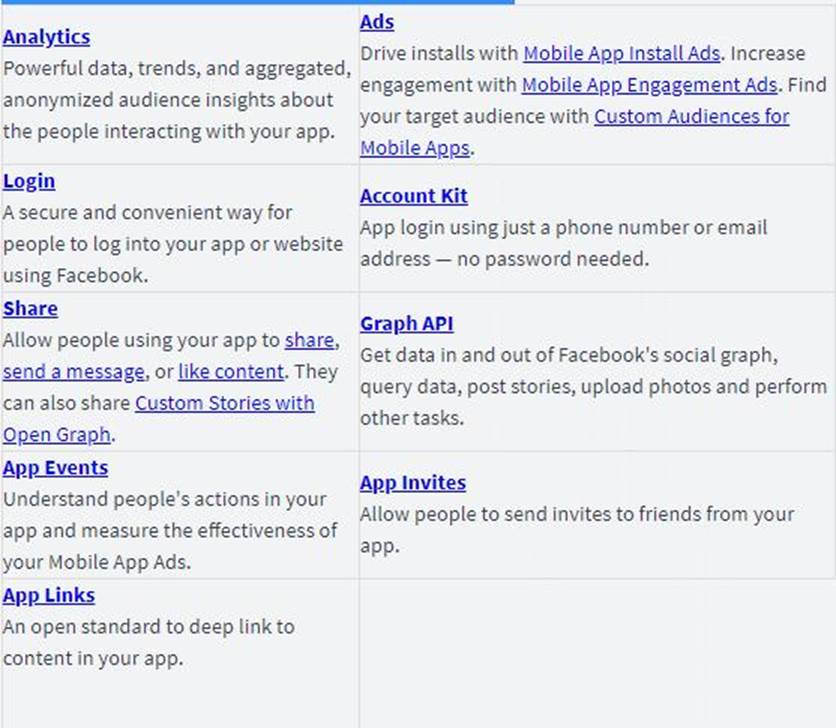
Which Facebook tools should they use on their mobile app? Select all that apply. Choose ALL answers that apply.
- A . Comments
- B . Facebook Analytics for Apps
- C . Account Kit
- D . Facebook Login
- E . Stories