
Cisco 300-175 Implementing Cisco Data Center Unified Computing (DCUCI) Online Training
Cisco 300-175 Online Training
The questions for 300-175 were last updated at Mar 02,2026.
- Exam Code: 300-175
- Exam Name: Implementing Cisco Data Center Unified Computing (DCUCI)
- Certification Provider: Cisco
- Latest update: Mar 02,2026
Which policy is used to update adapter firmware?
a. adapter policy
b. host firmware policy
c. management firmware policy
d. network control policy
Which options are valid port types when configuring fixed 10-Gb LAN interfaces on the Cisco UCS 6200 Series Fabric Interconnects? (Choose three.)
a. monitoring port
b. server port
c. uplink Ethernet port
d. FEX port
e. Fibre Channel storage port
When cabling a Cisco UCS 6200 Series Fabric Interconnect to disjoint Layer 2 networks, which option must be considered?
a. The fabric interconnect must be in switching mode.
b. You must first configure a LAN pin group.
c. Each VLAN is allowed across multiple disjoint uplinks.
d. Each vNIC can communicate to a single disjoint network.
Which two items represent the features of Call Home on the Cisco Unified Computing System? (Choose two.)
a. syslog
b. send fault details to Cisco TAC
c. SNMP trap receiver
d. send email alerts to administrators
e. central repository of normalized fault data
Which three items represent message formats that are available to send fault data using Cisco Call Home? (Choose three.)
a. short text
b. long text
c. HTML
d. SOAP API
e. XML
f. Java
Which BIOS setting is required for a VMware ESXi 5.0 host to support Cisco VM-FEX universal pasthrough mode?
a. VT for Directed IO
b. ACPI 10 Support
c. VEMDPA Agent
d. Execute Disabled Bit
e. Processor C State
What are the three main components of the VM-FEX environment? (Choose three.)
a. Red Hat Network Satellite server
b. ESX host with Cisco UCS M81KR VIC
c. ESX host with Cisco UCS M72KR CAN
d. VMware vCenter
e. VMware Update Manager
f. Cisco UCS Manager
g. Cisco VSG
Open the windows by clicking on the minimized at the bottom of the viewing area. Windows can be minimized by clicking on the [X], repositioned by dragging the title bar, and resized by using the handle at the lower right corner to customize the viewing area.
If you are required to access the devices to complete this scenario, the mouse cursor will use a hand symbol when moved over device icons. Clicking the icon will open a device terminal so you can interact with the hardware.
Open the Questions window and begin by clicking a question number. When you have completed answering all questions, click Done to continue.
Scenario
Use your UCS knowledge on Adapter errors ………………………………………configurations.
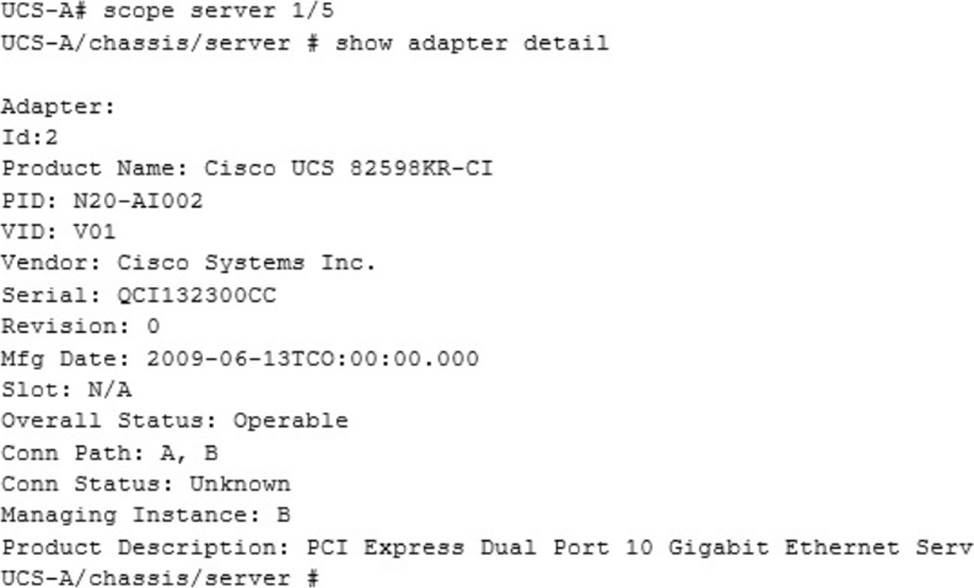
We are working on which server?
a. 1
b. 2
c. 3
d. 4
e. 5
Open the windows by clicking on the minimized title at the bottom of the viewing area. Windows can be minimized by clicking on the [-], repositioned by dragging the title bar, and resized by using the handle at the lower right corner to customize the viewing area.
If you are required to access the devices to complete this scenario, the mouse cursor will use a hand symbol when moved over device icons. Click the icon to open a device terminal to interact with the hardware.
Open the Questions window and begin with clicking a question number. When you have completed answering all questions, click Done to continue.
Scenario
Use your UCS knowledge on Fabric Interconnect Failover to answer the questions associated with the UCS cluster.
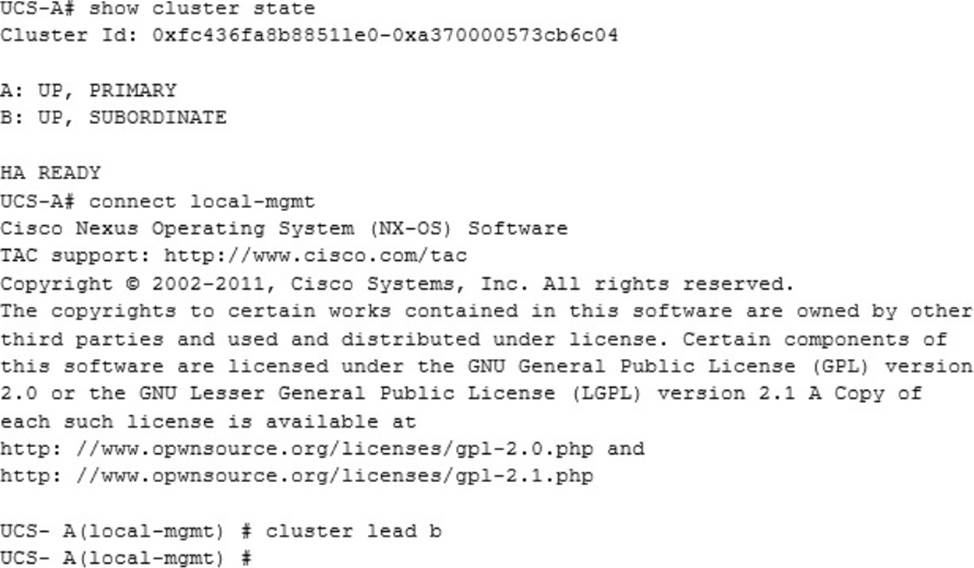
Which statements is true regarding the Fabric Interconnect Failover configuration changes?
a. High availability is being setup so that cluster a and b can both be subordinate or primary.
b. The fabric interconnect b changes from subordinate to primary.
c. High availability is setup so that fabric interconnect will keep a to be primary and b will be lead.
d. The Fabric interconnect can have lead states, so that b will switch to primary and a will stay primary.
Open the windows by clicking on the minimized at the bottom of the viewing area. Windows can be minimized by clicking on the [X], repositioned by dragging the title bar, and resized by using the handle at the lower right corner to customize the viewing area.
If you are required to access the devices to complete this scenario, the mouse cursor will use a hand symbol when moved over device icons. Clicking the icon will open a device terminal so you can interact with the hardware.
Open the Questions window and begin by clicking a question number. When you have completed answering all questions, click Done to continue.
Scenario
Use your UCS knowledge on Adapter errors………………………………………configurations.
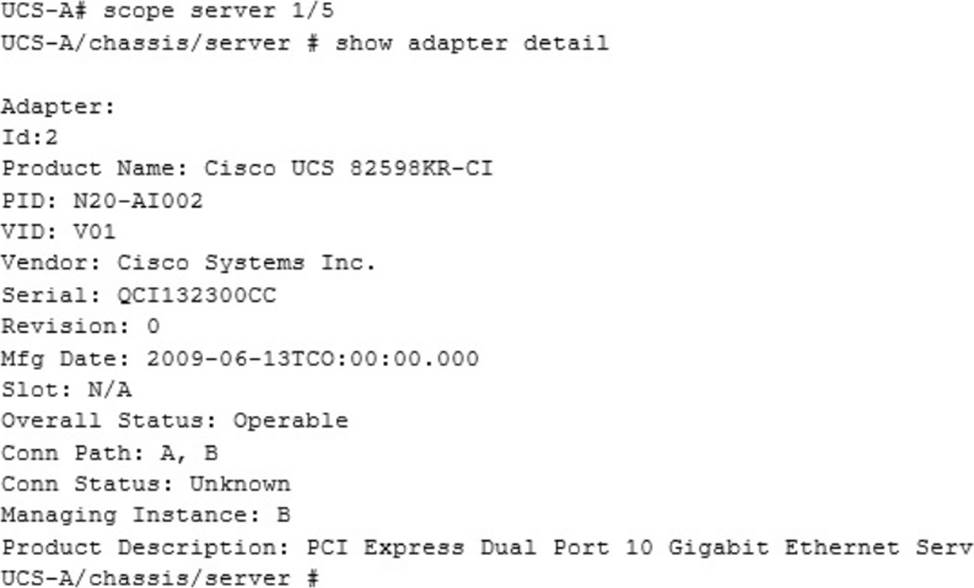
Current Adapter Connected Status is?
a. Operable
b. Down
c. Inoperable
d. Unknown
Latest 300-175 Dumps Valid Version with 465 Q&As
Latest And Valid Q&A | Instant Download | Once Fail, Full Refund
