
For creating variable sized bins we use __________________
A . Calculated Fields
B . Table Calculations
C . Sets
D . Groups
Answer: A
Explanation:
One way to view a measure in Tableau Desktop is to split it into bins. You can think of bins as buckets based on a range of values. For example, say you have a measure that represents age. Instead of aggregating the measure to calculate the average age, you can bin the measure to define age groups: 0C5, 6C10, 11C15, and so on. Then you can count the number of people in each age group.
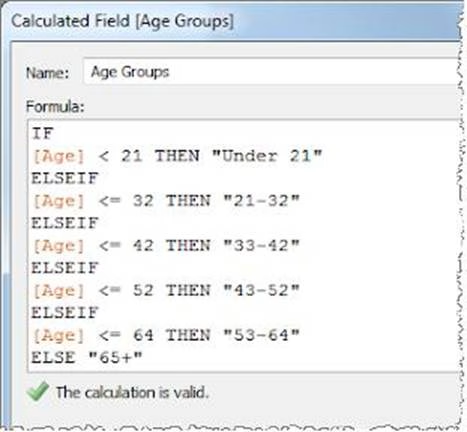
Create a calculated field for variable bin size
Step 1
Select Analysis > Create Calculated Field.
Step 2
In the Calculated Field dialog box, complete the following steps:
Reference: https://riti-ritesh.blogspot.com/2016/07/creating-variable-sized-bins_8.html
Latest TDS-C01 Practice Questions with 151 Q&As
Updated Study Material | Instant Download | Detailed Answers and Explanations