
You use Windows Admin Center to remotely administer computers that run Windows 10.
When connecting to Windows Admin Center, you receive the message shown in the following exhibit.
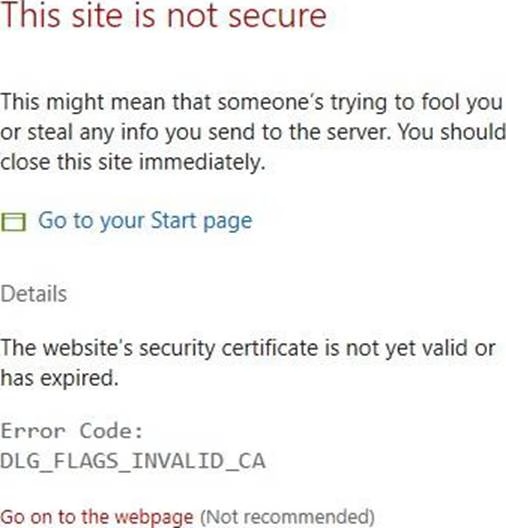
You need to prevent the message from appearing when you connect to Windows Admin Center.
To which certificate store should you import the certificate?
A . Client Authentication Issuers
B . Personal
C . Trusted Root Certification Authorities
Answer: C
Explanation:
"Error Code: DLG_FLAGS_INVALID_CA" while login to Admin Console after enabling HTTPS in PowerCenter.
Solution
To resolve this issue, add the CA-signed certificates to the "Trusted Root Certification Authorities" in the browser. After adding the certificates, restart the browser.
Reference: https://knowledge.informatica.com/s/article/578585
Latest MD-102 Practice Questions with 98 Q&As
Updated Study Material | Instant Download | Detailed Answers and Explanations