
You have an Azure Data Lake Storage Gen2 account that contains two folders named Folder and Folder2.
You use Azure Data Factory to copy multiple files from Folder1 to Folder2.
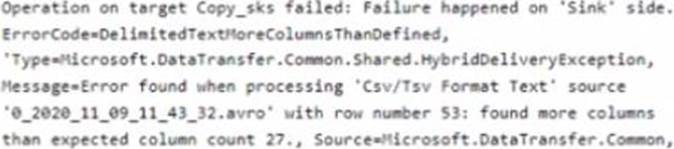
You receive the following error.
What should you do to resolve the error?
A . Add an explicit mapping.
B. Enable fault tolerance to skip incompatible rows.
C. Lower the degree of copy parallelism
D. Change the Copy activity setting to Binary Copy
Answer: A
Explanation:
Reference: https://knowledge.informatica.com/s/article/Microsoft-Azure-Data-Lake-Store-Gen2-target-file-names-not-generating-as-expected-using-create-at-runtime-option
Latest DP-203 Practice Questions with 116 Q&As
Updated Study Material | Instant Download | Detailed Answers and Explanations